
SEO & GEO for Independent
Music Venues
How to rank for your own shows, fight back against ticketing giants, and take back your audience online.
Written by
Bryson Meunier
Senior SEO Manager, Intuit QuickBooks
Columnist, Search Engine Land (since 2009)
Founder,  LLC · brysonmeunier.com
Published by
Chicago Independent Venue League
civlchicago.com
Written for CIVL's 41 independent member venues
IntroductionWhy This Guide Exists
You booked the show. You printed the flyers. You posted on Instagram. And then someone Googled the artist playing your room — and a ticketing giant's website showed up first, with a link to buy tickets somewhere else, possibly with fees attached that go nowhere near your venue.
This is not bad luck. It's a predictable, structural problem — and it costs independent venues real money every night.
Two kinds of companies compete with you for your own audience. Ticketing platforms host your event pages and collect the SEO credit. Discovery sites like Songkick, SeatGeek, Do312, and Bandsintown build richer event pages than most venues maintain, and outrank you for searches about shows at your own venue. This guide explains how both problems work and what you can do about them, in plain language for venue operators.
What's In This Guide
Section 01Understanding the Threat Landscape
Two Different Problems, Two Different Solutions
| Threat | How It Works in Search |
|---|---|
| Live Nation / Ticketmaster | When a primary ticketing platform hosts your event page, Google credits that page with the show's SEO authority. Your own site becomes a secondary result for your own event. You don't need to switch ticketing platforms. You do need your own show page with enough content to compete. |
| Event listing and ticketing platforms (Songkick, SeatGeek, Do312, Bandsintown) |
These sites index your shows and build richer event pages than most venues maintain. They often outrank you for searches about your own events — intercepting fans who already intended to buy from you. |
The Searches That Actually Matter
| Search type | US monthly volume | Competitive reality |
|---|---|---|
| "live music near me" | 135,000 | Enormous volume; Google personalizes by location. Win it via GBP, not your site. |
| "concerts in chicago" | 18,100 | Keyword Difficulty (KD) 52 — Ticketmaster #1, SeatGeek #2, Do312 #3, The Salt Shed #4. CIVL members appear in this top 10 (Old Town School, Salt Shed). Hard to win from a standing start, but members are already placing. |
| "chicago music venues" | 3,600 | KD 48 — Choose Chicago ranks #1 with an editorial list. The Hideout ranks #3. This is winnable with strong editorial content and member venue links. |
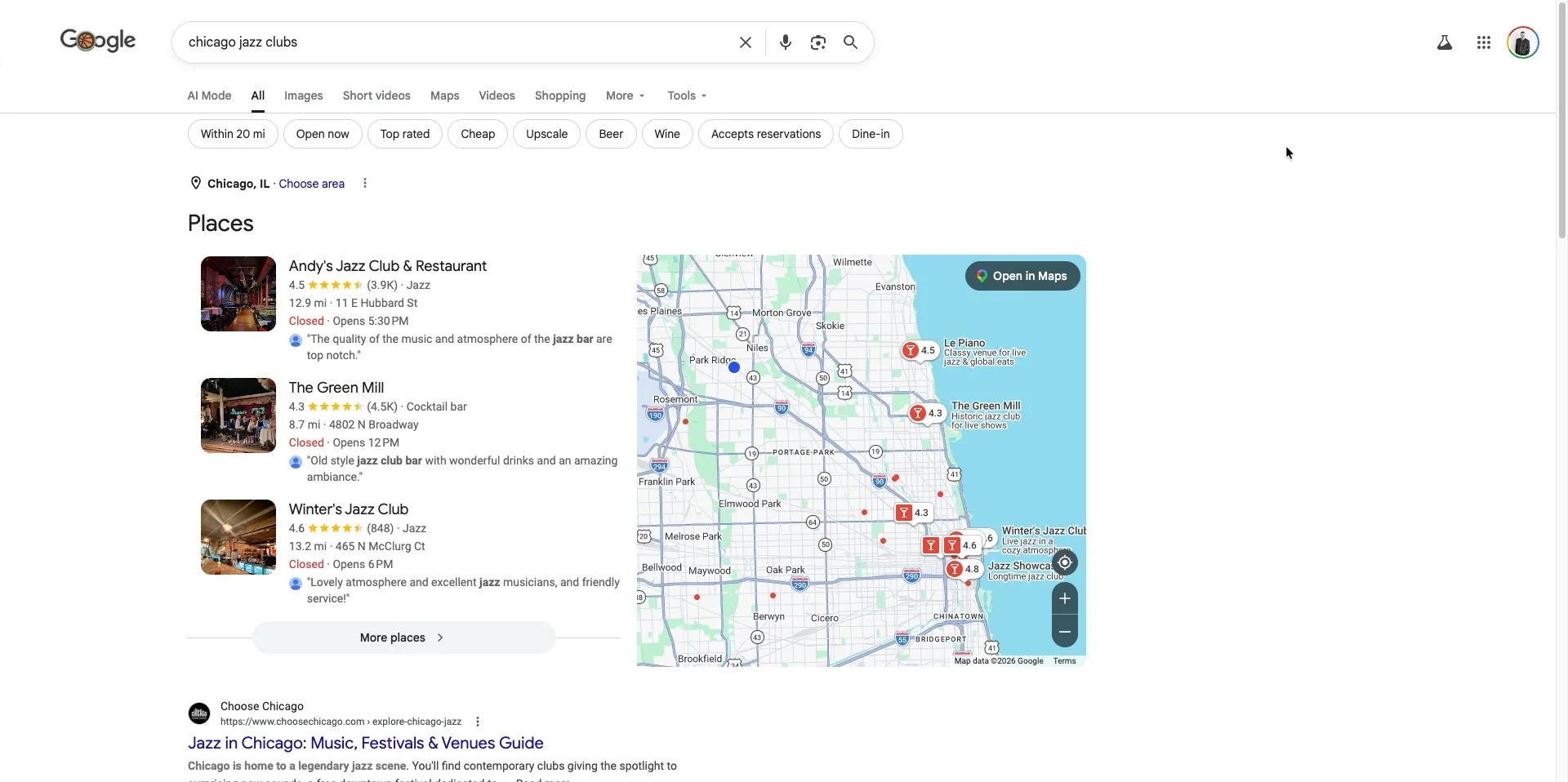
| "chicago jazz clubs" | 2,900 | KD 42 — achievable with a dedicated Chicago jazz guide page (see Section 13). |
| "[your venue name] chicago" | 1,200 (avg) | This is your turf. You should rank #1. If you don't, something is broken. |
| "[artist] at [your venue]" | 10–500 | Near-zero competition. You must rank #1 — it's a search for your show. |
| "bars with live music chicago" | 590 | KD 15 — highly winnable. Strong intent: fans looking for a night out, not a specific show. Any venue with a bar + live music can rank with a neighborhood page. |
| "free live music chicago" | 390 | KD 8 — near-zero competition. Venues that program free entry nights should have a dedicated page for this term. |
| "small music venues chicago" | 260 | KD 20 — winnable editorial target. Fans searching this want intimate experiences. Independent venues are the answer; they just need to say so. |
| "intimate concert venues chicago" | 110 | KD 5 — zero competition. One well-written venue guide page can rank within weeks. |
| "live music wicker park" | 70 | KD 0 — zero competition. Any venue with a neighborhood page ranks. |
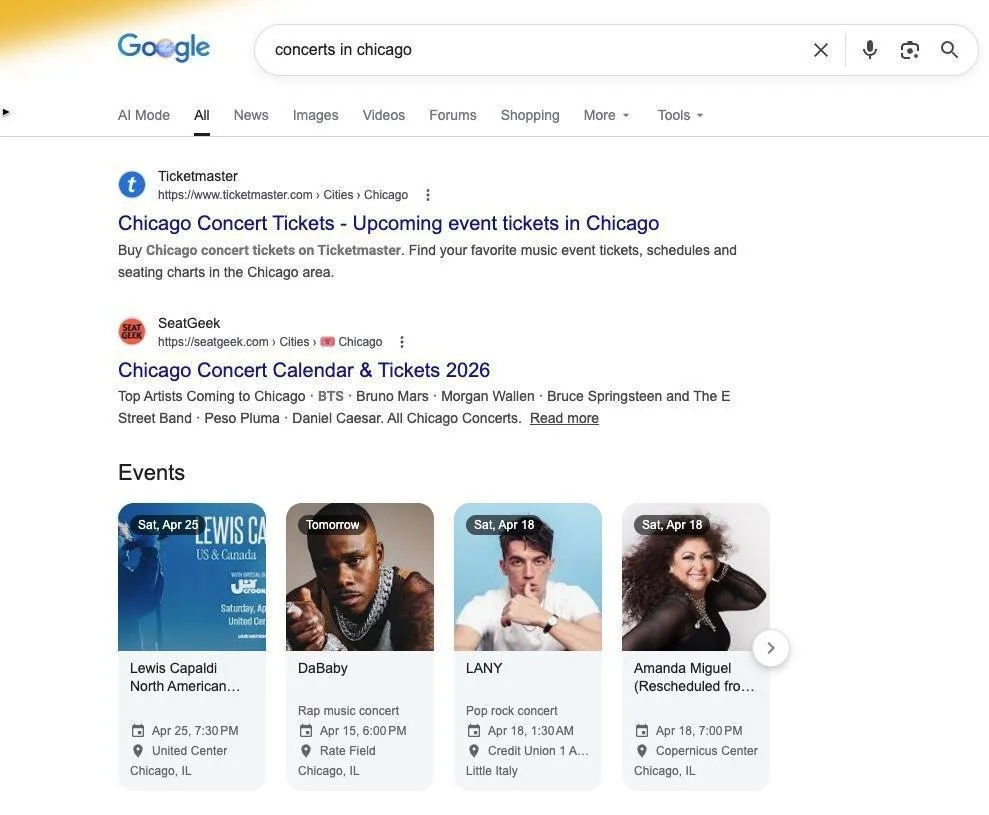
Across six major Chicago concert and venue search terms — totaling roughly 50,000 monthly searches — CIVL member venues appear in a minority of available SERP slots, though individual venues are already placing. Ticketing platforms dominate concert-intent terms. Venue-directory terms like "chicago music venues" are less dominated and more winnable for individual venues — The Hideout currently ranks #3 for that term.
A note on scope: this guide focuses on music venue search because that is the primary programming of most CIVL member venues. Comedy and theater venues face a distinct search landscape — "chicago comedy clubs," "improv theater chicago," "stand-up comedy chicago" — with different competitors and keyword economics. Annoyance Theatre and similar venues should treat the music-specific SERP analysis as directional context, not a direct map of their competitive environment. The tactical recommendations throughout this guide — schema, GBP, show pages, historic content — apply equally regardless of programming type.
Don't try to beat Do312 head-on. Capture the fans who already know your name (branded searches), and let CIVL's shared concerts calendar compete for discovery queries at a domain-authority level no individual venue can reach alone. Every ticket link on that page goes directly to the venue's own site. Section 13 covers how this works.
Section 02Your Google Business Profile (Start Here)
Most venues have one. Almost none are using it fully.
A Google Business Profile (GBP) exists for virtually every venue in this cohort — Google creates listings automatically for established businesses, whether the owner claims them or not. But claiming a profile and actively using it are two different things, and the gaps in the CIVL member data are significant.
An audit of the full CIVL member cohort found:
- Several venues have no hours listed in their GBP — including some high-profile rooms. Fans searching for those venues on Google cannot confirm they are open.
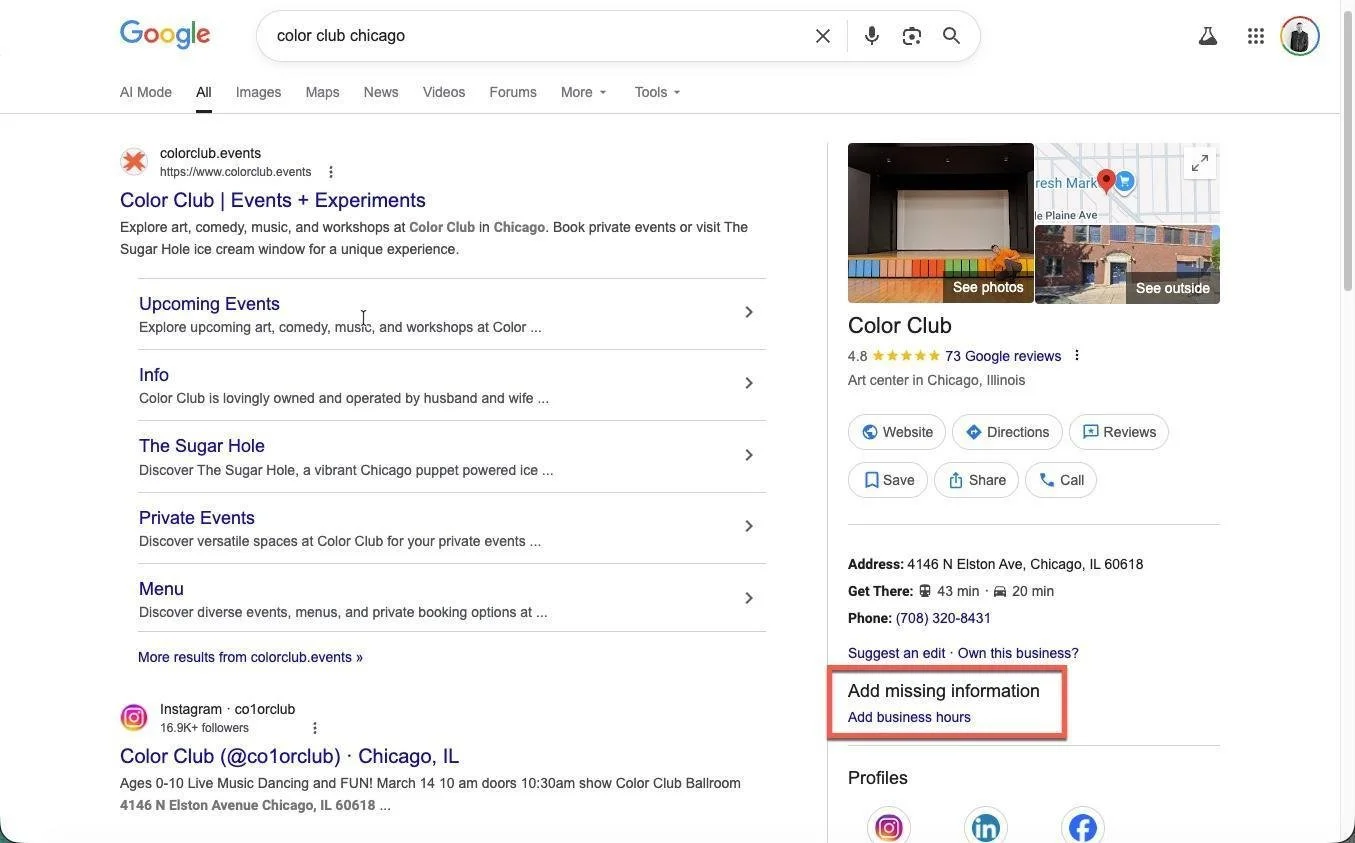
- 4 venues are not categorized as a music venue at all — appearing as generic "establishment" or "point of interest." For venues whose primary offering is live music, this matters: the wrong category limits which local searches find you. Theaters, galleries, and arts centers may legitimately use a different primary category, but any venue where live music is the main draw should have "Music Venue" or "Live Music Venue" as its primary GBP category.
- Review counts range from 73 to 4,823 among member venues — a 66x gap that reflects different levels of venue popularity, foot traffic, and profile activity.
- Most CIVL member venues are not posting their own events to GBP. Where events do appear in Knowledge Panels — as with the Empty Bottle — they typically come from structured data implemented by the venue's ticketing platform, not from the venue itself. That distinction matters: the visibility exists, but the venue doesn't control which ticket link appears.
The fix is straightforward. If your ticketing platform is putting events in your GBP panel, you're getting visibility — but the ticket link routes to their domain. Posting events directly through your GBP dashboard, or adding MusicEvent schema (Section 4) to your show pages, sends that link to your own site instead.
The rest of this section covers the full GBP setup — including the basics for any venue that hasn't yet claimed and verified theirs — but even venues with active, well-maintained profiles should read Step 3 on events posting carefully. It is almost certainly a gap.
Step 1: Claim and Verify Your Profile
Go to business.google.com. Search for your venue name. If it appears, click "Claim this business." If it doesn't appear, click "Add your business." Google will verify ownership via postcard, phone, or video (see support.google.com/business for current options). According to Google's own local ranking documentation (support.google.com/business/answer/7091), claiming and verifying your profile is a prerequisite for Google to consider your business information authoritative.
Step 2: Fill In Every Field Completely
- Business name — your actual venue name, no keyword stuffing
- Address — must exactly match what's on your website and everywhere else online
- Phone number — your main venue line
- Website — your main domain (not a ticketing page, not Facebook)
- Hours — including special holiday hours; many venues across independent music cohorts are missing this
- Business category — "Music Venue" as primary; add "Bar," "Concert Hall," or "Live Music Venue" as secondary; wrong category limits which local searches find you
- Description — 2–3 sentences; include your neighborhood and genre focus naturally
- Attributes — answer all questions Google asks (wheelchair accessible? live performances? reservations?). The full list of available fields is at support.google.com/business.
Step 3: Post Your Shows as GBP Events (The Universal Miss)
This is the feature almost no independent venue uses, and it is the highest-impact step in this entire section. GBP lets you post upcoming events that appear directly in your venue's Knowledge Panel — the box that shows when someone searches your venue name. Each event post shows the artist name, date, a photo, and a link. That link can go directly to your own ticket page.
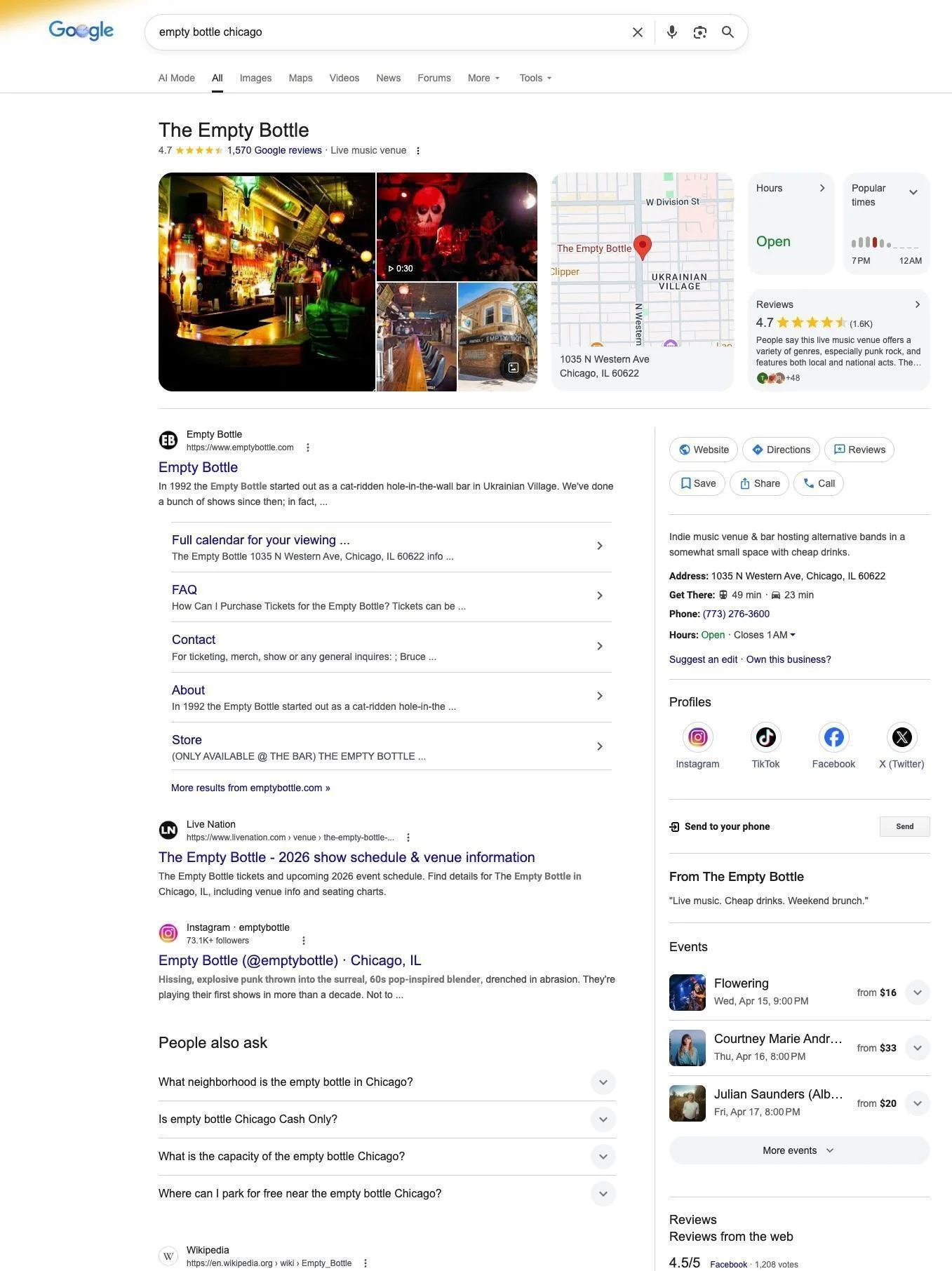
When a fan searches "Hideout Chicago" or "Reggie's Live upcoming shows," they see your GBP panel before they visit any other site. If your next three shows are posted there with direct ticket links, you have intercepted that fan at the exact moment of intent — without competing against Songkick or Do312 for a search result. A qualifier worth understanding: if your ticketing platform implements structured data on their event pages — as TicketWeb does for venues it partners with — Google may surface those events in your Knowledge Panel automatically. That's visibility you're getting for free. The catch is that every ticket link in that panel routes to the platform's domain, not yours. If the goal is simply "fans see my shows when they search for me," the ticketing platform's schema may already be doing that work. If the goal is "fans click through to pages I control and buy tickets where I keep the customer relationship," that requires event pages on your own domain with your own schema — which is what Section 4 covers.
For each show: post the event name (artist + date), date and time, a photo, and a link directly to your ticket page on your own domain. Posts expire after the event date, so the workflow is: post each show when you announce it, update the link if the ticket URL changes, and let it expire naturally after the show. If you add structured data (MusicEvent schema, covered in Section 4) to your show pages, Google can automatically surface your events in your Knowledge Panel without manual GBP posts. Manual event posts are a faster alternative that doesn't require schema; adding schema to your site is the more durable fix.
Also in this step: check who controls the "Tickets" button on your Google Business Profile. Third-party resellers can populate that button automatically via their own integrations, routing fans to their site before they ever reach yours. To take it back, go to GBP dashboard → Edit Profile → Links, enter your official ticketing URL, and mark it as your primary link. Google uses this to determine the preferred source. The exact UI label shifts as Google updates its interface, but this is always in the Links section of Edit Profile. Check it quarterly — resellers can re-populate it.
Step 4: Photos and Q&A
Photos give fans a sense of the room before they commit to a show. Add exterior photos, interior and stage photos, and photos from recent shows (check photographer usage rights first). Also check the Q&A section — anyone can post questions, and anyone can answer them. Find unanswered questions and answer them yourself before a stranger does it incorrectly.
Step 5: Reviews
Google reviews affect both your local ranking and your click-through rate. Copy your review link from the GBP dashboard (Share > Copy link) and put it in your email newsletter and at the venue. Never solicit fake reviews — Google detects this and penalizes the profile. Always respond to reviews, especially negative ones — a thoughtful response to a bad review often does more for your reputation than the review itself.
Section 03Your Shows and Events Pages
The Most Underoptimized Pages on Most Venue Websites
Many venue websites list shows as bare-bones calendar entries: artist name, date, maybe a price. From an SEO perspective, these pages are nearly invisible to Google because they contain almost no content to evaluate. Discovery platforms like Songkick and Do312 have rich event pages with artist bios, tour histories, and links. That's a significant part of why they rank above you.
Here's the competitive advantage venues rarely use: discovery sites have scale but often thin content. Songkick, Bandsintown, and SeatGeek index every show at every venue, but their event pages are essentially identical — artist name, date, price, a buy button. They cannot write a genuine paragraph about why seeing a specific artist in a 300-cap room on a Tuesday night is different from seeing them at a 5,000-seat theater. You can. That difference is exactly what Google's quality signals increasingly reward, and it's the gap that a well-written show page exploits.
What Every Show Page Should Have
- Artist name — as the page's title tag AND its H1 heading. These should match or closely reflect each other. If the page title says "Hideout Chicago" and the H1 says "Glass Brain," Google sees a contradiction.
- Date and time — written out in full, not just "Sat 8pm"
- Venue name and address — even though Google can often figure this out, stating it explicitly removes ambiguity for crawlers and users
- Ticket price or price range
- A paragraph about the artist — 2–5 sentences. Who are they? What kind of music? Why come?
- A link to buy tickets — prominent, on your own domain where possible
- A photo — artist photo (with rights cleared) or a venue show photo
On that last point: the alt text on every photo matters for both accessibility and search. Use this format for show photos: "[Artist Name] performing live at [Venue Name], [City]." For example: "Horsegirl performing live at Empty Bottle, Chicago." Fans search for artist photos. A correctly tagged image on your show page can surface in Google Image search for that artist's name — another way your page gets found before discovery platforms do. The same format applies to any image on the page: be specific, be accurate, skip phrases like "image of" or "photo of" (Google ignores them).
The Show Page Title Tag Problem
Across the CIVL member sites audited, the most common show page problem was a mismatch between the page title and the show content. The pattern appears in several forms:
- Bare venue name as title: Every page on the site reads "Hideout Chicago" — the show name only appears in the H1. Google can't easily distinguish one show from another because every page looks identical in search results, and is unlikely to spend crawl resources figuring it out.
- Missing titles entirely: Some WordPress sites leave title tags completely empty sitewide, defaulting to a generic template. Google then writes its own title — usually wrong.
- Boilerplate titles: The same generic title applied to every page regardless of content.
The fix for any CMS is the same: your show page title should read [Artist Name] | [Date] | [Venue Name] or similar. On WordPress, one Yoast/RankMath template configuration fixes all pages simultaneously. On Webflow, one CMS collection template update covers all current and future shows. On Squarespace, each page's SEO settings section accepts a custom title.
Recurring Events and Duplicate Titles
Many venues run recurring weekly or monthly events — open mics, DJ nights, jazz series, comedy residencies. These are great for building a regular audience. They're also a common source of duplicate title problems that quietly suppress search rankings.
The pattern: each occurrence gets its own dated URL (/events/all-love-apr-2026, /events/all-love-mar-2026) but the title stays identical across all of them. Google sees 15 pages that all say "All Love — The Whistler" and can't distinguish one from another — creating a duplicate content problem that hurts every one of those pages.
The fix: append the month and year to the title of each dated instance. "All Love — April 2026 | The Whistler, Chicago" is unique. On Squarespace, set a custom title in each page's SEO settings. On WordPress with Yoast, configure the title template to include the post date. Better still: a single evergreen page per recurring event, so authority compounds on one URL instead of splitting across dozens.
URL Structure for Show Pages
yourvenuesite.com/shows/2025-09-12-artist-name✓yourvenuesite.com/events/?id=4872✗ (hard for both users and search engines to parse)yourvenuesite.com/cal/09122025✗ (opaque date codes help no one)
Modal and Overlay Show Pages: The Hidden Indexing Trap
Some venue websites display show details in a modal window or overlay — a pop-up that appears when you click "Info" or "Details" on an event listing. This pattern is common on venue sites built with JavaScript-heavy frameworks and calendar plugins. It is invisible to Google users.
The Empty Bottle's website is a clear example: clicking "Info" on any show opens a modal overlay with the artist name, date, doors time, age policy, and a ticket link — but the URL in the browser bar never changes. There is no unique page for that show. No title tag. No H1. No indexable URL. Google may render the overlay content, but it has no separate page to rank in search results, so fans searching for that specific show won't find it on the venue's site. AI crawlers, which typically don't execute JavaScript, miss the content entirely.
If your show details open in a modal or overlay, every recommendation in this section — title tags, H1s, schema markup, artist descriptions — is inaccessible by default. The fix is to give each show its own permanent URL that resolves to a real HTML page. This does not require rebuilding your entire site. It requires configuring your event system so that each show has a linkable page, not just a JavaScript-triggered overlay. On WordPress, this typically means using a proper event post type rather than a calendar widget. On Squarespace and Webflow, events should be CMS items with individual pages enabled, not hidden behind a pop-up.
Keep Past Shows Online
Many venue websites delete show pages after the event. For pages that earned press coverage or backlinks, this is an SEO mistake — those signals are lost when the page disappears. Keep high-value pages live with a "This show has passed" note and a link to upcoming events. For show pages with no inbound links and no traffic history, a 404 or noindex is reasonable — not every past show listing needs to live forever. The question is whether the page has signals worth preserving.
Historic Shows as SEO Content: Your Most Underused Asset
Every independent venue has a list of shows that, in retrospect, were historic — artists who went on to massive fame and played their room early, legendary nights that fans still talk about, cultural moments that happened on a stage no bigger than a living room. These stories are among the most valuable content a venue can publish, and almost no venues publish them.
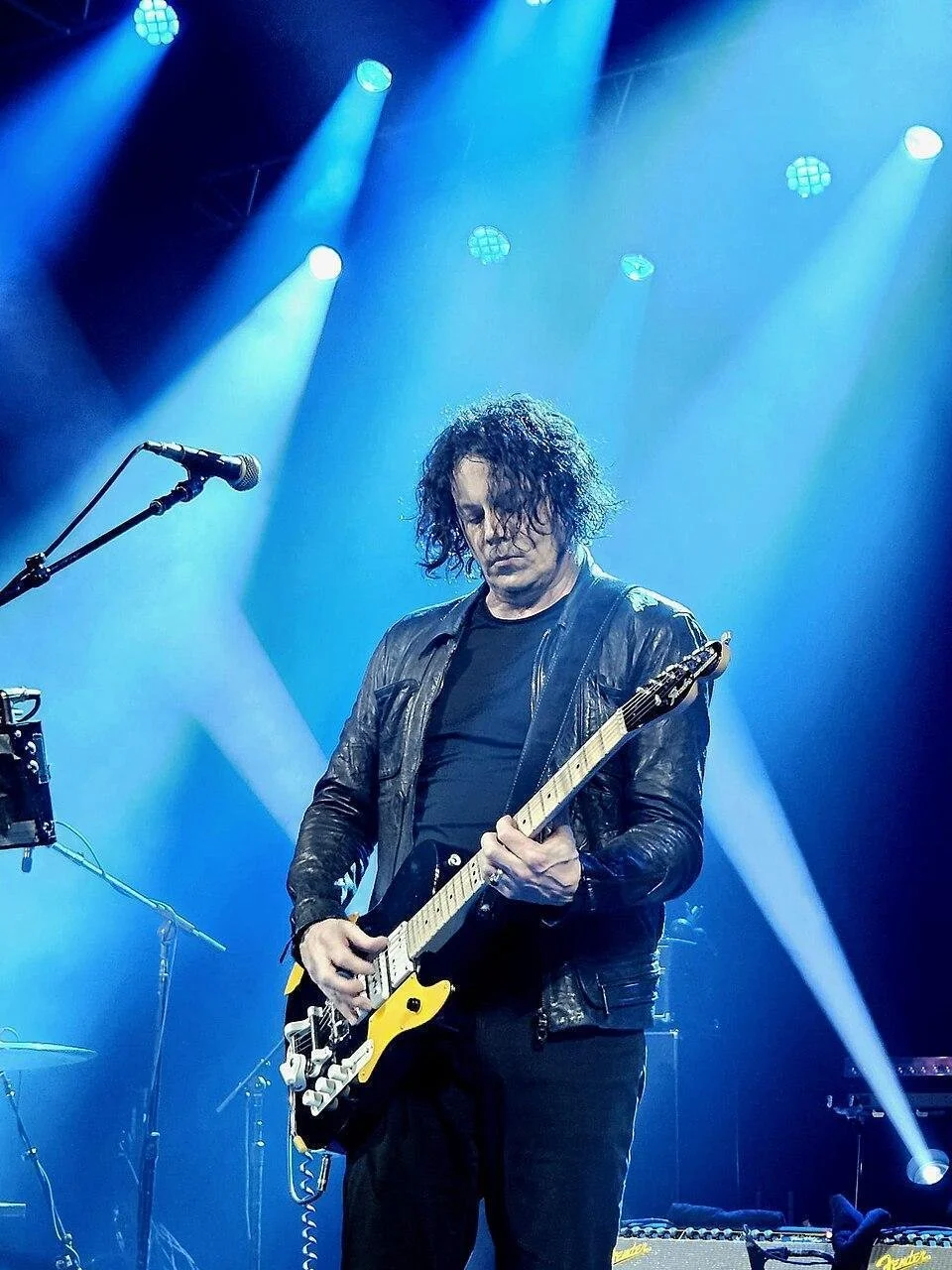
The SEO logic is straightforward: when an artist like the White Stripes gets inducted into the Rock and Roll Hall of Fame, searches for "White Stripes Chicago shows" and "White Stripes Empty Bottle" increase. The Empty Bottle has the legitimate claim — the band played there six times in 2000-2001, making it their Chicago home before breaking through. A dedicated retrospective page would rank for those searches essentially uncontested, earn links from fan communities and music press covering the induction, and signal to Google and AI systems that the Empty Bottle is an authoritative source on significant music history.
| Venue | Historic show opportunity |
|---|---|
| Metro Chicago | The Smashing Pumpkins played their first show ever at the Metro on October 5, 1988 — also Jimmy Chamberlain's first show as drummer. Metro owner Joe Shanahan is credited in the band's Wikipedia article for giving them their first booking on the condition they find a real drummer. 38 total performances over the band's career. A farewell concert in 2000 where attendees received a recording of the 1988 debut. No individual show pages exist on metrochicago.com. |
| Empty Bottle | White Stripes (6 shows, 2000-2001), early Yeah Yeah Yeahs, TV on the Radio, Modest Mouse touring The Lonesome Crowded West ($7 in 1998), Built to Spill, Interpol, Animal Collective — all documented in press. A 2016 blog post on emptybottle.com lists these shows but no individual page exists for any of them. |
| Schubas Tavern | Neko Case performed on August 5, 2001, filmed by WTTW for a broadcast special — footage still on PBS.org. The National, Janelle Monae, My Morning Jacket all documented as early Schubas performers. Schubas is a designated Chicago landmark. None of this appears as a show page. |
| Hideout Chicago | Mavis Staples recorded a full live album there (Live: Hope at the Hideout on Anti- Records). The Freakons — a Mekons/Freakwater supergroup — recorded their album at the Hideout. Jack White played the Hideout in the White Stripes era. The venue's own history page mentions him by name with a vivid specific story — but it's buried in an undifferentiated prose block, not a show page. |
| Rosa's Lounge | Founded after its Italian-immigrant owner met Junior Wells and Buddy Guy in Milan in 1978 and came to Chicago on Wells's invitation. Junior Wells, Son Seals, Pinetop Perkins, Homesick James, and the Rolling Stones have all performed. John Primer's Grammy-nominated album Teardrops for Magic Slim was recorded live at Rosa's. Rosa's does have a history page (rosaslounge.com/pages/the-story), but it's a single prose paragraph with no individual show pages, no setlists, and no dedicated page for the Grammy album recording. The material is there; it just isn't structured for search. |
What a Historic Show Page Looks Like
A retrospective show page does not require original reporting. It requires assembling what already exists: a date, a setlist (available on setlist.fm for thousands of documented shows), any press coverage from the time, a quote from the owner or booking staff about why the show mattered, and a line about what the artist did next. 400-600 words. One photo if you have it. A link to any surviving audio or video. That is enough to rank, earn links, and give AI systems something to cite.
The best time to publish a historic show page is when the artist is in the news — a Grammy nomination, a Rock Hall induction, a reunion tour, an anniversary album. These are the moments when the music press is writing "where did they play before they were famous?" and when fan communities are actively searching for exactly the content your venue can provide. The news creates the demand; your page captures it.
Section 04Schema Markup
Telling Google Exactly What's on Your Page
Schema markup (also called structured data) is code you add to your website that explicitly tells search engines what type of content is on a page. When implemented correctly, schema markup can trigger "rich results" — showing your events in a visual card format with dates, prices, and links directly in Google's search results, before a user even clicks your site.
Not one CIVL member venue audited for this guide had MusicEvent schema on their show pages. Some venues — including the Empty Bottle — have Organization or LocalBusiness structured data on their homepage, but none had the event-specific markup that enables rich results for individual shows. This is a near-universal miss — and a significant opportunity, because the venues that implement it first will have a visible advantage in search results.
The Schema Types That Matter for Venues
| Schema type | Where to use it / What it does |
|---|---|
| MusicEvent | Every individual show page. Enables event rich results with date, time, artist, ticket link. The most valuable schema type for venues that program live music. |
| MusicVenue | Your homepage and About page. Tells Google your site represents a music venue, establishing entity authority for "music venue" searches. |
| NightClub | Homepage for nightclub/DJ venues (e.g. Spybar). Use instead of MusicVenue when DJ programming, bottle service, and club culture are the primary offering. |
| Brewery / FoodEstablishment | For venues with on-site brewing or significant food operations (e.g. Ramova's Off Hours Beer Co., Uncommon Ground). Captures searches for the food/drink offering. |
| FAQPage | Any page with FAQ content. Makes individual Q&A pairs eligible to appear directly in search results. Several venues (Ramova, Rosa's Lounge, Spybar) have substantial FAQ pages that are strong candidates. |
| TheaterEvent | For comedy and theater venues (e.g. Annoyance Theater). Use TheaterEvent schema on show pages rather than MusicEvent — it signals the correct venue type to Google. |
MusicEvent Schema: The Core Example
<script type="application/ld+json">
{
  "@context": "https://schema.org",
  "@type": "MusicEvent",
  "name": "The Coup at Empty Bottle",
  "startDate": "2025-10-03T21:00",
  "location": {
    "@type": "MusicVenue",
    "name": "Empty Bottle",
    "address": "1035 N Western Ave, Chicago, IL 60622"
  },
  "offers": {
    "@type": "Offer",
    "url": "https://emptybottle.com/tickets/the-coup",
    "price": "20",
    "priceCurrency": "USD"
  }
}
</script>
How to Implement Schema (Without Being a Developer)
Option 1: Ask Your Web Developer
Show them this section. The MusicEvent schema example above can be used directly — your developer just needs to swap in the correct event name, date, venue address, and ticket URL for each show page. Ask them to also add MusicVenue schema to your homepage and about page.
Option 2: Use a Plugin (WordPress)
Plugins like "Rank Math" or "Yoast SEO" can generate event schema automatically from your event posts — no code required. This is the fastest path for any WordPress venue.
Option 3: Webflow Custom Code
Webflow allows custom code injection in page settings and CMS collection templates. Adding a schema block to the Shows collection template covers all current and future show pages simultaneously. One configuration change, comprehensive coverage.
Option 4: Google Tag Manager
If you use Google Tag Manager, your developer can inject schema via a Custom HTML tag without touching your site's core code.
Testing Your Schema
After schema is implemented, test it at search.google.com/test/rich-results. Paste your show page URL and confirm that Google is detecting three specific fields: location (your venue), startDate (the show date and time), and offers (ticket price). If any of those are missing from the test output, the schema on that page is incomplete and won't trigger event rich results. Note: MusicEvent schema on your show pages also powers the Events section of your Google Business Profile Knowledge Panel automatically — Google reads your structured data and surfaces events there without requiring manual GBP event posts. This is the scalable path: implement schema once and your events appear in both search results and your GBP panel.
Section 05Your Venue's Brand and Name Consistency
Google Needs to Know Exactly Who You Are
One of the most common and costly SEO mistakes independent venues make is inconsistent information across the web. Your venue's name, address, and phone number (often called NAP) must be identical everywhere it appears online. Even small variations cause problems.
Your Homepage Title and Description
Your homepage title should lead with the non-brand phrase you want to rank for, then your venue name, then your location. Your venue name will come up naturally in branded searches regardless of where it sits in the title, so the front of the title is the space to target searches you're not winning yet. Examples:
- Indie Rock Venue in Wicker Park | Empty Bottle | Chicago
- Live Music Venue in Pilsen | Thalia Hall | Chicago
- Chicago Concert Venue on Goose Island | The Salt Shed
Avoid generic titles like "Home" or "Welcome." Your meta description — the 155-character summary that appears in search results — should be written to earn a click, and should be unique for every major page on your site. Multiple member venues were found with the same meta description applied to every page on their site; Google rewrites these and the result is rarely better than what you'd write yourself.
The NAP Consistency Audit
Most important platforms to check: Google Business Profile, Yelp, Facebook, Apple Maps, Bing Places, Songkick, Bandsintown, Do312, SeatGeek, Eventbrite, Foursquare/Swarm, TripAdvisor, and your own website — every page that lists your address.
Wikipedia Pages
Several Chicago venues have Wikipedia pages (Metro, Auditorium Theatre, Riviera Theatre, Park West). These are valuable — Wikipedia is highly trusted by Google and often feeds Knowledge Panels. If your venue has a legitimate claim based on history, press coverage, or cultural significance, it's worth pursuing. You cannot create your own page, but you can work with a Wikipedia editor or PR agency.
Section 06Local SEO — Getting Found By People Near You
Why Local SEO Is Different
Local SEO helps you rank for searches with geographic intent — "live music near me," "jazz bar in Wicker Park," "things to do in Pilsen this weekend." These are some of the most valuable searches for venues because they come from people with money in hand who are looking to go out tonight. Google's three main local ranking factors: Relevance (does your business match the search?), Distance (how close are you?), and Prominence (how well-known and well-reviewed are you?). Distance is fixed. Relevance and prominence are within your control.
Neighborhood Content
Create content specifically about your neighborhood — but pick pages that don't compete with your homepage for your core function. If your homepage already targets "live music [neighborhood]" searches, a separate page on the same topic just cannibalizes its authority. Instead, target the questions your homepage can't answer: where to eat before the show, where to park, what else is happening nearby, the history of music in the neighborhood. A page titled "Pre-Show Dining Near [Your Venue]" or "Parking Near [Your Venue]: Everything You Need to Know" will rank for searches your homepage never could, and will bring in fans already committed to attending a show.
Concrete title formats that work for this:
- "Where to Eat Before a Show at [Your Venue]"
- "Before the Show: Best Spots Near [Your Venue]"
- "[Your Neighborhood] Music Scene: Our History"
- "Parking Near [Your Venue]: Everything You Need to Know"
Build Local Links
- Local press — Chicago Reader, Time Out Chicago, block club blogs. Pitch your shows to writers covering live music.
- Neighborhood associations and chambers of commerce — many have local business directories.
- Artist websites and management — ask them to link to your show page on your own site (which should contain the ticket link), not directly to a third-party ticketing platform.
- Festival and event websites — if you co-present or participate in festivals, make sure there's a link back to your site.
Reddit links are nofollow and don't pass direct link equity, but active participation in neighborhood music threads drives real traffic and builds the kind of community presence that correlates with local search prominence.
Recovering Lost Backlinks: The 404 Audit
Every venue website has pages that used to exist and no longer do — old show pages deleted after the event, ticketing subdomains that were retired, calendar pages that changed URL structure, COVID-era content that was removed. When other websites linked to those pages (music press reviews, artist tour announcements, fan sites, local blogs), those links now point to a dead page and the link equity is lost.
This is not a small problem. Across the CIVL member sites audited, significant referring domain equity is sitting on 404 pages:
| Venue / Dead URL | Referring domains lost |
|---|---|
| lh-st.com — secure.lh-st.com/ (old ticketing subdomain) | 76 referring domains — the largest single recovery opportunity in the cohort |
| lh-st.com/tickets.aspx | 13 referring domains |
| lh-st.com/calendar.aspx | 12 referring domains |
| metrochicago.com — The Strokes benefit concert page | 20 referring domains |
| metrochicago.com — Liquid Soul / Music for Mars event page | 24 referring domains |
| hideoutchicago.com — Freakons patio show page | 21 referring domains |
| hideoutchicago.com — statement from owners (Oct 2022) | 6 referring domains |
| emptybottle.com/music-friendly-distancing (COVID-era) | 8 referring domains |
The fix in every case is the same: a 301 redirect from the dead URL to the most relevant live page. If a show page is gone, redirect it to the artist's tag page or the events archive. If a ticketing subdomain was retired, redirect it to the homepage. If a COVID-era content page was deleted, redirect it to the about page. This takes 30 minutes for a developer and recovers link equity that has been sitting idle, often for years.
How to Find Your Own Dead Backlinks
- Go to Google Search Console > Pages > Not indexed, and look for "Not found (404)." Click into that report to see which of your URLs are returning errors; Google surfaces example referring pages (both internal and external) for each 404, though not aggregated link counts. Use this report to find pages worth redirecting.
- Check SEMRush's Backlinks tool (or Ahrefs) for your domain. Filter by "broken" to see 404 pages with referring domains. Sort by referring domains descending — the top results are your highest-priority recovery targets. Note: if you received the CIVL Immediate Actions document alongside this guide, your specific dead backlinks are already listed there — no tool subscription required.
- For each 404 with referring domains, set up a 301 redirect to the most logical live equivalent. Your web developer can do this in an afternoon.
What to Do With Dead Links: A Step-by-Step
Once you've found dead pages with referring domains, here's the order of operations:
- Sort your dead pages by referring domains, highest first. A page with 20 referring domains is worth 10x more effort than a page with 2.
- For each dead page, identify the best live equivalent: old show page goes to artist tag or events archive; retired ticketing subdomain goes to homepage; deleted COVID content goes to about page.
- Set up 301 (permanent) redirects from the dead URL to the live equivalent. The exact path differs by platform, and platforms occasionally move these settings around — if something below has moved, search the platform's help center for "301 redirect." As of this writing: on WordPress, use the Redirection plugin (wordpress.org/plugins/redirection) or Yoast SEO Premium. On Squarespace, Settings → Developer Tools → URL Mappings (support.squarespace.com). On Webflow, Site Settings → Publishing → 301 redirects (help.webflow.com) — note this requires a paid hosting plan. On Wix, Settings → SEO → URL Redirect Manager.
- Verify in Google Search Console: after setting the redirect, go to URL Inspection and request indexing for the dead URL. Google will follow the 301 and credit the live page.
- For high-value dead pages (20+ referring domains), consider rebuilding rather than just redirecting. A rebuilt page earns back old links and can attract new ones. See the next section.
Unlinked Mentions: Easier Wins Than New Links
Every backlink reclamation requires a developer and a redirect. There's a faster category of link-building that requires only an email: unlinked mentions. These are articles, blog posts, and local coverage that name your venue without linking to it. They already know you exist; they just forgot to link.
Set a Google Alert (alerts.google.com) for your venue name. When a new mention appears without a link, send a short note to the writer: "Thanks for the mention — would you be able to add a link to [your homepage or relevant show page]? Happy to return the favor if useful." Keep it brief, make it easy, and don't ask them to link to a third-party ticket page — ask for a link to a page you own. This works particularly well after press coverage of a show or event: the story is fresh, the writer is easy to reach, and the ask is low-friction.
The Bigger Opportunity: Historic Show Pages Replace the 404
The best outcome is not just a redirect — it is rebuilding the page. A Metro show page for the Strokes benefit concert that 20 domains linked to should be rebuilt as a proper retrospective show page: what the show was, why it mattered (a benefit for a city council candidate), who played, what the night felt like. That page then earns back those links and starts earning new ones from anyone who writes about the show in the future. A 301 redirect recovers the past. A rebuilt page compounds it.
The CIVL Collective Linking Strategy
Being listed on civlchicago.com provides a legitimate, high-quality backlink. But the more powerful opportunity runs in the other direction: member venues linking to CIVL creates a collective SEO asset that benefits everyone. We recommend CIVL build two resource pages that every member venue should then link to:
| CIVL Page | What It Does For You |
|---|---|
| civlchicago.com/concerts-in-chicago | A live calendar of shows across all member venues. Targets "concerts in Chicago" (18,100 searches/month). Every ticket link goes to individual venue sites — not a third-party platform. |
| civlchicago.com/chicago-music-venues | An editorial directory of all member venues with descriptions, photos, and genre/neighborhood filters. Targets "chicago music venues" (3,600/month) and dozens of low-competition neighborhood and genre variants. |
Section 07Ticketing Strategy and SEO
Your Ticketing Setup Affects Your Search Visibility
The choice of ticketing platform matters for SEO — but not in the way most venue operators think. The problem isn't using a third-party platform. It's using one as your only show page. When a fan searches for your event and the only result is on ticketmaster.com or ticketweb.com — because your own site has no event page at all — the platform wins search by default. Your own website isn't losing a competition. It's not in the race.
| Ticketing Approach | SEO Impact |
|---|---|
| Self-hosted ticketing on your domain | Best. Your domain gets full SEO credit. You own the customer data and email relationship. |
| Embedded widget (e.g. DICE, Stripe) on your site | Good. Transaction stays on your domain. Customer experience is seamless. |
| Independent platform (own page) — e.g. Eventbrite | Neutral to mixed. You get some traffic from Eventbrite's platform. They get the SEO credit for the event page. |
| Primary ticketing platforms that don't white-label (Ticketmaster, Live Nation, AXS, Tixr, and others) | Problematic if it's your only event page. If you also maintain a content-rich show page on your own site with the ticket link embedded or linked, your page can rank alongside or above the platform's page for branded searches. |
If you use a third-party platform, at minimum ensure your own event page exists with full content, and the third-party page is an additional option rather than the only option.
Google awards search ranking to the most complete, most linked-to version of an event page. If that page is on your domain — with artist info, date, description, and a ticket link — your site gets the credit. If the only event page is on the ticketing platform, they get it. The practical fix isn't switching ticketing platforms. It's creating a real show page on your own site for every event, even if the ticket purchase happens elsewhere. That page can rank. The platform link alone cannot rank for your venue.
The most common version of this problem: a venue with a well-maintained website but no individual show pages at all. Every event links directly off-site to a ticketing platform, and the venue's own domain has nothing for Google to index. A crawl of two CIVL member venues (Beat Kitchen and Subterranean) found every upcoming show linking directly to a ticketing platform with zero event pages on the venue's own site. For any show-specific search — artist name, date, event title — the ticketing platform is the only result. The fix doesn't require switching platforms. It requires creating a show page: artist name, date, a paragraph of description, a ticket link. The transaction can still happen on TicketWeb. But the discovery happens on your site.
Data Ownership
When a fan buys through a third-party platform, the data relationship is governed by that platform's terms. Platforms like TicketWeb do share some buyer data with venues as "Event Partners" — enough to send event-specific notifications. But the ongoing marketing relationship, the purchase history, and the customer database belong to the platform. When fans buy through your own platform, all of that is yours. The practical difference: a venue on TicketWeb can email ticket buyers about the show they bought. A venue on its own platform can email them about every future show, build a loyalty program, and run presales to people who actually attended. That compounding fan relationship is what independent ticketing preserves.
Section 08AI Search and Bot Visibility (GEO)
What Is AI Search?
The way people find information is changing. Google has added AI-generated summaries (AI Overviews) to many search results. ChatGPT, Perplexity, and similar tools answer questions that used to go to search engines. Voice assistants increasingly pull from AI models rather than traditional rankings. Optimizing for these systems is called Generative Engine Optimization (GEO — also called Answer Engine Optimization (AEO) or AI Search Optimization).
The JavaScript Rendering Problem — Invisible to AI Bots
This is one of the most important findings from the CIVL crawl audit, and it affects more venues than most operators realize.
When your website relies on JavaScript to display content — show listings, event calendars, menus — there are two different problems depending on which crawlers are trying to read it:
| Crawler type | JavaScript support |
|---|---|
| Googlebot (Google search) | Can render JavaScript, but with a delay of hours to days. Content may be indexed eventually — but complex JS apps and embedded widgets are not guaranteed. |
| ClaudeBot (Anthropic) | Cannot execute JavaScript. Sees only raw HTML. Dynamic content is completely invisible. |
| GPTBot (OpenAI) | Cannot execute JavaScript. Same as above. |
| PerplexityBot | Cannot execute JavaScript. Same as above. |
| Most other AI crawlers | Cannot execute JavaScript. Raw HTML only. |
The Color Club had the same problem at a smaller scale: its music and comedy section pages showed 15 and 34 words respectively — because the actual show listings were being rendered by JavaScript and were invisible to crawlers. The venue exists; its programming does not, as far as AI systems are concerned.
What This Means Practically
If your show listings are displayed via an embedded external calendar widget, a JavaScript-heavy event management system, or a ticketing platform's embedded widget — those shows are invisible to AI crawlers. When someone asks "what's happening at [your venue] this weekend?" the AI system cannot answer from your site because the shows don't exist in its crawlable view of the web.
The fix is the same one that helps Google: static HTML content. Even a simple plain-text list of upcoming shows in your page's HTML, not generated by JavaScript after page load, makes the difference between existing in AI knowledge and not. A JavaScript rendering analysis across all 41 CIVL member sites found several with 90%+ of their content JS-rendered — Empty Bottle, Thalia Hall, Salt Shed, and the Harold Washington Cultural Center — along with Metro and Ramova above 50%. Every one of those sites is effectively invisible to AI crawlers.
What AI Systems Look For
- Content in crawlable HTML — not rendered by JavaScript after page load
- Structured data (schema markup — see Section 4)
- Authoritative sources: Wikipedia, press coverage, established review sites
- Consistent entity information: your name, location, and genre appearing together across many sources
- Clear, factual prose that directly answers common questions about your venue
Write Content That Answers Real Questions
Add FAQ content that answers the questions your staff fields every week. A dedicated FAQ page is fine for evergreen venue questions (parking, capacity, age policy, accessibility, refund policy), but show-specific questions — doors vs. start time, opener, curfew — belong on the show page itself, not buried in a general FAQ. The best questions to answer are the ones that already appear in Google's "People Also Ask" box for your venue name or genre: that's Google telling you exactly which questions it wants answered. Common venue questions include:
- Is there parking nearby?
- What's the venue's capacity?
- Is it 21+ or all ages?
- Can I bring a camera?
- What's your refund / exchange policy?
- Is the venue accessible for wheelchairs?
Several audited venues (Ramova with 5,197 words on their FAQ page, Spybar, Rosa's Lounge) have extensive FAQ content. Adding FAQPage schema to these pages makes individual Q&A pairs eligible to appear directly in search results, and makes the content more citable by AI systems.
Section 09The Facebook-Only Venue Problem
Why Facebook Is Not a Website
This section is for venues that operate without a standalone website — using only a Facebook page, an Instagram account, or a listing on a third-party platform. It's a common situation in independent music, particularly for newer rooms, smaller neighborhood bars, and venues in markets with less web infrastructure. The SEO problems are fundamental: operating without your own website puts you at a structural disadvantage that no amount of third-party platform optimization can fix. Facebook controls how your page appears in search results, what information is shown, and whether your page stays up at all. You cannot add schema markup, control your meta title, or optimize individual show pages.
There's a second problem beyond control: Facebook's organic reach has been declining for years. Pages that once reached thousands of followers now reach a fraction of them without paid promotion. Your fans may have liked your page and never see your show announcements. Operating without a website means depending on a platform that is actively reducing the value of what you've built on it.
Immediate Steps for Facebook-Only Venues
- Verify your Facebook Page — Settings > General > Page Verification. A verified page ranks better in Facebook's internal search and appears more trustworthy to Google.
- Fill in every field — address, phone, hours, category (Music Venue), and a full description. Google crawls Facebook pages and uses this information.
- Add each show as a Facebook Event, not just a post. Facebook Events are indexed by Google and can appear in search results independently.
- Include ticket links on every Facebook Event — ideally to whatever platform you use to sell tickets.
- Claim your Google Business Profile — even without a website, you can have a GBP that points to your Facebook page as a temporary measure.
Building a Minimal Website
A basic venue website does not need to be complex. The minimum viable venue website: homepage with venue name, address, neighborhood, genre focus, and a photo; events page listing upcoming shows with dates, artists, and ticket links; About page with your history, capacity, and what makes you different; Contact page with address, phone, and hours. Squarespace, WordPress.com, or Wix make this achievable for roughly $15–20/month.
Section 10Platform-Specific Issues
The findings below are drawn from crawls of all 41 CIVL member sites and a JavaScript rendering analysis across the same set. Patterns noted as universal were confirmed across every platform examined.
Issues Found Across All Platforms
| Issue | Prevalence across CIVL member sites |
|---|---|
| Zero schema markup of any kind | Every venue crawled |
| No XML sitemap found on the domain | Every venue crawled |
| Twitter/X links not updated (twitter.com still linked, or 520 error) | About a quarter of venues |
| Missing or overlength meta descriptions | Nearly every venue |
| Images over 100KB (most over 500KB) | Nearly every venue |
| Missing image alt text | Nearly every venue |
| Missing H1 on key pages including homepage | A large majority of venues |
WordPress-Specific Issues
WordPress sites in the cohort (Schubas/Lincoln Hall, Metro, Reggie's Live) shared several issues that are easy to fix with the right plugin:
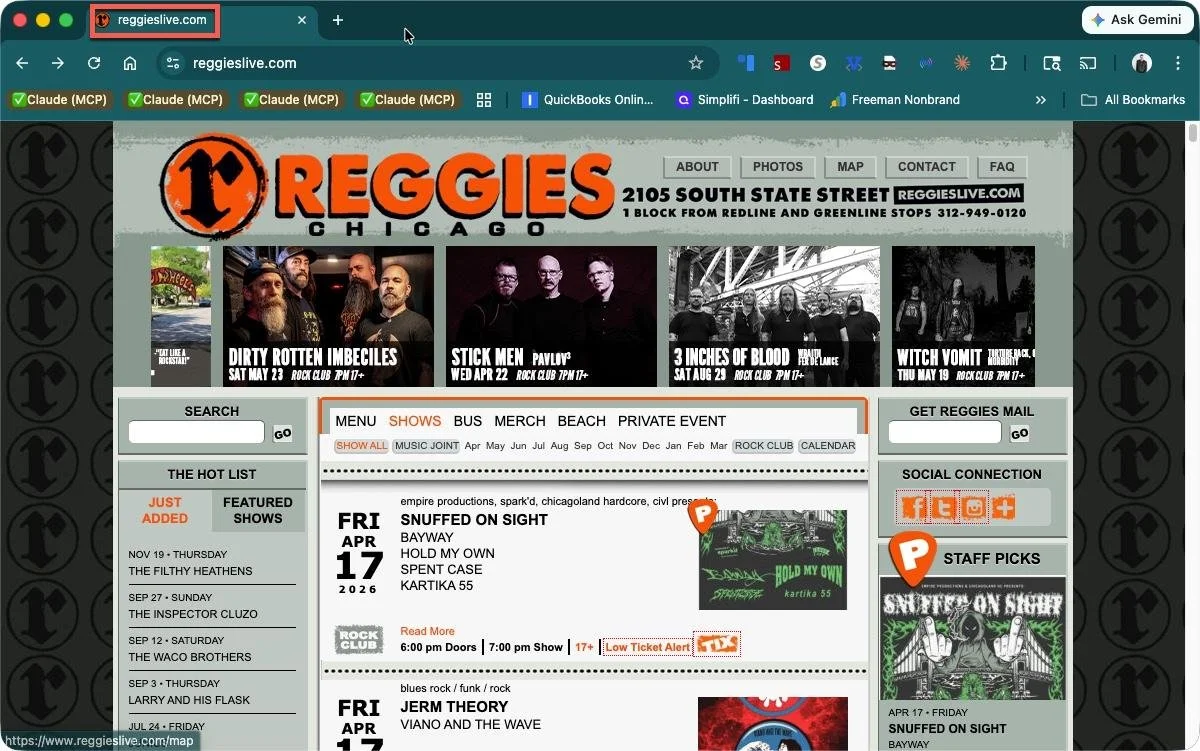
- Missing title tags sitewide — Reggie's Live had zero title tags on all 574 indexable pages. One Yoast or RankMath title template configuration fixes this for every existing and future page.
- Missing meta descriptions sitewide — same fix. RankMath and Yoast generate meta descriptions from post content automatically if no manual description is set.
- H1 tags defaulting to site name — when a WordPress theme outputs the site name as H1 on every page instead of the page/post title, it makes every page look identical to Google.
- Mixed content (HTTP resources on HTTPS pages) — affects older WordPress sites that predate HTTPS. Fix using the Better Search Replace plugin to convert all HTTP URLs to HTTPS in the database.
- 302 redirects instead of 301s — temporary redirects on high-traffic pages don't pass link equity. WordPress doesn't create these on its own; they usually come from plugin configurations or server settings.
- No individual show pages — all tickets off-site: Two CIVL member venues (Beat Kitchen and Subterranean, both managed by BKBG Management) have well-maintained WordPress sites with zero on-site event pages. Every show links directly to a ticketing platform, meaning artist-specific searches return nothing from the venue's own domain. The fix is creating a WordPress post for each upcoming show — artist name, date, description, embedded ticket link. This is the single highest-leverage SEO change available to venues in this situation, requiring no plugin, no developer, and no template changes.
- Image compression: WordPress does not compress uploaded images by default. Smart Bar had 31 images over 100KB, including portrait images uploaded at full camera resolution — 2.2MB, 2.1MB, 1.9MB. Reggie's Live had 454 images totaling 520MB. The fix: install ShortPixel or Imagify, run bulk compression on the full media library (this covers all historical uploads, not just new ones), and enable automatic compression for future uploads. Target under 200KB per portrait image, under 100KB for thumbnails and banners.
Squarespace-Specific Issues
Squarespace sites (Salt Shed, Thalia Hall, Empty Bottle, Color Club) have limited but accessible SEO settings:
- Per-page titles and meta descriptions — available in each page's Settings > SEO tab. Not set by default; must be configured manually for every page.
- No server-side control of redirects — Squarespace does not allow robots.txt customization (you cannot block spider trap URLs). Contact Squarespace support if you have problematic calendar parameter URLs.
- Images — Squarespace applies some CDN optimization, but large source files still create slow load times. Compress images before uploading (target under 200KB for photos).
Wix-Specific Issues
Wix sites (Uncommon Ground, Annoyance Theater, Spybar) had some of the most severe image problems in the cohort, plus a unique spider trap issue:
- Image sizes — Wix serves images from wixstatic.com with minimal compression by default. Spybar had single images at 20MB, 18MB, and 16MB. Compress all images before uploading; target under 200KB per image.
- Open mic / recurring event spider trap — Wix's recurring event feature generates new URLs for each occurrence with an ever-growing string of characters appended. These extend indefinitely into the future and can generate thousands of indexable pages if not controlled. Contact Wix support to noindex recurring event pagination.
- Sitewide noindex — Wix has a global "Hide site from search engines" toggle in Settings → SEO. When this is on, every page returns a noindex directive and Google will not index anything. It is most commonly switched on during site construction and never switched back off. One CIVL member venue had this active on their entire live site, resulting in only 16 organic keywords and 263 estimated monthly visits despite having 220 referring domains. The fix is a single toggle: Settings → SEO → Site Visibility → set to visible. Check individual page SEO settings panels too.
- Meta description length — Wix allows meta descriptions but doesn't enforce a character limit. Many Wix sites had 78+ overlength meta descriptions.
Webflow-Specific Issues
Webflow sites (Hideout, Ramova) were the most technically clean in the cohort, but shared a specific gap:
- CMS collection title templates — Webflow's CMS allows dynamic title generation from collection fields, but this must be configured manually. Both Webflow venues had "Venue Name" as the title for every show page because the CMS template wasn't configured to pull from the show name field. One template change in Webflow Designer fixes all current and future shows.
- Canonical tags — Webflow does not automatically output canonical tags. Enable them in Page Settings for each page, and in Collection Settings for CMS templates.
- Schema via custom code — Webflow supports custom code injection at the page level and in CMS collection templates. This is the cleanest way to add MusicEvent schema to every show page.
Niche Platform Issues
Two venues in the cohort use specialized platforms with limited SEO configuration:
- Seat Engine (Rosa's Lounge) — a niche venue CMS with limited access to title tag templates, canonical tags, and meta descriptions. Many fixes require working with Seat Engine support rather than making changes directly. The most urgent issue: calendar pagination URLs (
?month=X&year=Y) extending indefinitely into the future must be blocked in robots.txt or via a noindex directive applied to the calendar parameter template. - Plot (Sleeping Village) — a venue-specific CMS used by a small number of independent music venues. Plot generates clean, indexable HTML event pages. The main limitation is bot-protection configuration: Plot sites often run behind Cloudflare or similar services that block automated crawlers with 403 errors. This does not typically affect Googlebot, which has its own verified identity. If your Plot site is blocking crawlers, check Cloudflare Security settings and ensure Bot Fight Mode is not blocking all bots indiscriminately. SEO configuration (titles, meta descriptions, schema) is managed through the Plot admin panel — contact Plot support for per-page SEO field access.
Spider Traps: The Calendar URL Problem
A spider trap is a set of URLs that a crawler can follow indefinitely, wasting crawl budget and potentially causing duplicate content issues. Event calendars are a common source for venue websites:
| Venue / Platform | Spider trap pattern |
|---|---|
| Rosa's Lounge (Seat Engine) | /calendar?month=5&year=2026, /calendar?month=6&year=2026 ... extending indefinitely into the future. All indexed, all with identical thin content. |
| Uncommon Ground (Wix) | Open mic recurring event generating paginated URLs with ever-lengthening hash strings. Extends indefinitely. |
| Hungry Brain (WordPress / SeeTickets plugin) | /?sepage=2, /?sepage=3 ... and /calendar/?sepage=2, /calendar/?sepage=3 ... extending indefinitely. Generated by the SeeTickets WordPress plugin for calendar pagination. All indexable, all sharing the same title and meta description as the homepage. Fix: add Disallow: /?sepage= and Disallow: /calendar/?sepage= to robots.txt, or contact SeeTickets support to apply noindex to paginated template pages. |
The fix in both cases: add a "noindex" meta robots tag to calendar parameter URLs, or block them in robots.txt with Disallow: /calendar?. This stops Google from crawling or indexing the infinitely-generated URLs while leaving the main calendar page accessible.
Indexed Pages That Should Not Be Indexed
Several venues had utility or account pages indexed by Google with hundreds of internal links pointing to them:
- Login/signup pages — Rosa's Lounge had /login indexed with 290 inlinks sitewide. These have no search value and waste crawl budget. Add noindex to any login, signup, password reset, or account management page.
- Old or placeholder content — multiple sites had COVID-era pages, "we are back" announcements, and even a page with CMS field labels as the live meta description ("This page has no text." was appearing in Google search results for lh-st.com/merch). COVID-era policy pages are a particularly common leftover: two CIVL member venues still had active /covid-policy pages indexed and linked from navigation in April 2026. Remove them from navigation and either delete with a 301 redirect to your about page, or add a noindex tag. A third member venue still had a Covid-19 link in its sitewide nav four years after the pandemic's acute phase.
- Draft or staging pages — Annoyance Theater had a Wix draft page (/copy-of-about) accidentally published and indexed. Check your CMS for unpublished drafts that may have been made accidentally public.
www vs. Non-www Canonical Split
Static HTML sites (and occasionally improperly configured WordPress or Squarespace sites) can exist at both www.yourdomain.com and yourdomain.com simultaneously, with neither version consistently redirecting to the other. Google treats these as two separate sites competing for the same content. Carol's Pub had this problem: www pages canonicalized to non-www, but the homepage canonicalized to www — meaning Google saw two indexable versions of most pages depending on which URL was followed. The result is split link equity and duplicate content signals across every page.
The fix has two parts: (1) configure a server-level 301 redirect so that every request to the non-preferred version redirects permanently to the preferred version (e.g. www → non-www or non-www → www — pick one and be consistent), and (2) set all canonical tags across the site to point to the preferred version. For static HTML sites, the redirect goes in an .htaccess file (Apache) or nginx config. For WordPress, a plugin like Redirection can handle this. Squarespace and Wix handle this automatically and are not affected by this issue.
Broken Ticketing Platform Links
Outbound links to ticketing platforms can break without warning when the platform changes its URL structure, a show sells out and the URL is retired, or a venue switches ticketing providers without updating old links. Carol's Pub had 57 outbound links to TicketWeb all returning 530 errors (a Cloudflare-level failure indicating the target server is unreachable) — meaning every ticket purchase link on the site was broken. Screaming Frog's 5xx report surfaces these. Check it quarterly, or after any ticketing platform change, and update or remove broken links promptly. A venue whose ticket links don't work loses revenue even when the SEO is working correctly.
Meta Descriptions as Body Copy Dumps
The guide covers overlength meta descriptions, but a related pattern is worth naming separately: the body copy dump. This is when the meta description field is populated not with written copy but with raw page content — audio equipment specs, staff email addresses, venue dimensions, or the full text of an event description running to 1,800 characters. Subterranean's /venue-specs/ page had its meta description populated with "CABARET ROOM FOH MIDAS M32IP DIGITAL FOH CONSOLE KLARK DN 360 DUAL GRAPHIC EQ WHIRLWIND SPLIT SYSTEM..." — the first line of audio equipment specs. The /contact/ page had staff email addresses as its meta description. Cole's Bar event pages had meta descriptions of 572–1,891 characters pulled from full event descriptions. Google rewrites all of these, but the underlying data can confuse crawlers and waste the meta field entirely. Every meta description should be a written sentence or two, under 155 characters, describing what the page is about and why someone should click.
Broken Page Titles from Empty CMS Fields
Some CMS platforms generate page titles by combining a page-specific field with a site-name suffix — e.g. [Page Title] — [Site Name]. When the page-specific field is left empty, the title renders as just the separator and site name: "- Subterranean Live" for the /in-the-news/ page is one example observed in the crawl. These are easy to miss because the page appears to load correctly in the browser — the broken title only shows up in the <head> of the page or in a crawl tool. Check your page titles column in Screaming Frog: any title that starts with a punctuation character (dash, pipe, colon) followed by the site name is a sign that the page-specific field is empty. Open that page in your CMS editor and add a real page title.
Section 11Discovery Platforms as Allies
Working With the Sites That Compete With You
It might feel counterintuitive to optimize your presence on event listing platforms when they often outrank you for your own shows. But these sites drive real discovery traffic — fans who didn't know about a show until they saw it on Do312, and who then become regulars. The strategic goal is to claim your space on these platforms while ensuring your own website captures the high-intent traffic.
| Platform | How to Claim Your Venue |
|---|---|
| Songkick | songkick.com/artist-claim — search for your venue and request management access |
| Do312 | do312.com — use their venue submission or contact form |
| Bandsintown | artists.bandsintown.com — primarily for artists, but venues can be added |
| SeatGeek | seatgeek.com/enterprise — their venue/partner portal |
| Yelp | biz.yelp.com — free business owner account |
| Eventbrite | eventbrite.com/organizer — free organizer account |
Once you've claimed your profiles, treat them like secondary websites. Let them do discovery while your own site captures conversion. Anyone who finds you on Do312 or Songkick should be able to get back to your own site easily from there.
Section 12Your Priority Action List
What To Do First
This guide covers a lot of ground. Here's a prioritized sequence — do these in order, and don't try to do everything at once.
Week 1: The Foundations (Free, Low-Tech)
- Claim and verify your Google Business Profile at business.google.com
- Fill in every field on your GBP completely and accurately
- Make sure your venue name, address, and phone are identical on your website, GBP, Facebook, and Yelp
- Add three recent photos to your GBP
- Post your next three upcoming shows as GBP events with links to your own ticket pages
- Update your Twitter/X footer link from twitter.com to x.com (still unchanged on about a quarter of CIVL member sites)
Month 1: Content and Structure
- Audit your show pages — does every page have the show name in both the title tag AND the H1?
- Update your homepage title to include your venue name and neighborhood
- Write a unique meta description for every core page — homepage, about, events, contact
- Add or update a FAQ page on your website with practical venue questions
- Check all event listing sites and press mentions — are ticket links going to your site or a third-party platform?
- Noindex any login, signup, password reset, or admin pages that appear in your sitemap or have internal links
- Submit your sitemap to Google Search Console (search.google.com/search-console)
Month 2–3: Technical (Needs Developer Help)
- Implement MusicEvent schema markup on all show pages
- Implement MusicVenue schema on your homepage and about page
- Add FAQPage schema to any page with FAQ content
- Ensure all past show pages redirect to your calendar rather than returning 404 errors
- Fix any 302 (temporary) redirects on high-traffic pages — change to 301 (permanent)
- If your show listings are JavaScript-rendered: add a static HTML summary of upcoming shows to each section page
- Compress your images — target under 200KB per photo before uploading
- If you have calendar parameter URLs indexed (?month=X&year=Y): block them in robots.txt or add noindex
Ongoing (Monthly)
- Add new shows to GBP within 48 hours of announcing them
- Check the "Tickets" button on your GBP listing in Google Maps monthly — confirm it's routing to your site or your primary ticket provider, not a reseller
- Review Google Search Console → Pages → Not Indexed monthly: look for expired event pages returning 404 errors that have inbound links, and redirect them
- Respond to all Google reviews within a week
- Pitch upcoming shows to local press (Chicago Reader, Time Out, neighborhood blogs)
- Verify that artist and booking agent submissions link back to your ticket page — and once you have strong event pages on your own site, ask them to link to those as well
- Review your GBP Insights and Google Search Console's Performance report monthly to see what searches are driving your profile visits
Section 13Building CIVL's Content Authority
Why This Section Is in a Guide for Venue Operators
The SEO tactics in this guide help your individual venue website rank for your own shows and your own name. There's a second layer of advantage that only works collectively: CIVL as an organizing entity can implement fixes across all 41 member venues simultaneously in a way no individual venue can replicate alone. A single schema configuration deployed across every member site. A collective linking strategy that amplifies every participant's domain authority. A shared concerts calendar that targets queries none of them could rank for individually. This is not charity — it's a structural SEO advantage that discovery platforms and ticketing giants can't replicate, because they don't have relationships with venues. CIVL does.
Where civlchicago.com Stands Today
As of this writing, civlchicago.com has an Authority Score of 19 — the lowest in the CIVL member cohort — reflecting a site with almost no indexed content beyond its homepage. It gets an estimated 12 monthly visitors from organic search. This is fixable, and the member venue links described in Section 6 are a major part of fixing it. But links alone aren't enough — the destination needs to earn them with real content.
The Pages CIVL Should Build — Prioritized
Priority 1: The concerts calendar and venue directory (build now)
- civlchicago.com/concerts-in-chicago — live event calendar, all member venues, all ticket links go directly to venues
- civlchicago.com/chicago-music-venues — editorial directory with descriptions, photos, neighborhood and genre filters
Priority 2: Neighborhood guides (highest speed-to-rank ratio)
Neighborhood-level searches have near-zero competition and real volume. A single well-written page per neighborhood ranks within weeks, not months.
| Keyword | Monthly volume | KD / Opportunity |
|---|---|---|
| pilsen bars | 880 | KD 0 — fastest win on this list |
| wicker park bars | 1,000 | KD 26 — winnable within 2–3 months |
| logan square bars | 1,600 | KD 41 — medium effort, strong payoff |
| live music wicker park | 70 | KD 0 — zero competition, own it permanently |
| live music pilsen | 20 | KD 0 — same, first page immediately |
Priority 3: Genre guides
| Genre guide | Primary keyword / volume | Notes |
|---|---|---|
| Chicago jazz clubs | "chicago jazz clubs" — 2,900/mo, KD 42 | Constellation, Hungry Brain are the answer. |
| Chicago blues bars | "chicago blues bars" — 260/mo, KD 43 | Rosa's Lounge and Blue Chicago are both CIVL members and primary sources. Any credible guide needs both on it — a Chicago blues bars page with a single venue listed isn't a guide, it's a venue page with a bad title. |
| Chicago electronic venues | "chicago house music" — 2,400/mo, KD low | Smart Bar is ground zero for house music history. |
| Chicago folk venues | "chicago folk music venues" — low volume, near-zero KD | Old Town School anchors it. |
| Chicago punk / indie venues | "chicago punk venues" — 70/mo, KD 20 | Empty Bottle, Subterranean, Metro define this. |
Priority 4: Music history pages (long game, high authority value)
These pages have modest direct traffic but outsized authority value — they earn links from Wikipedia, music journalism, academic sources, and AI citation systems. The house music page is the strongest opportunity: "who invented house music" (390/mo, KD 0) and "where was house music invented" (210/mo, KD 0) are both featured snippet opportunities. The answer is Chicago, and the primary venue claim belongs to Smart Bar — exactly the kind of historic show page the guide recommends individual venues build on their own domain (Section 3). CIVL's role here is to link to Smart Bar's page from a broader "Chicago house music" genre guide, boosting its authority rather than competing with it.
Priority 5: The State of Live Report — Make It a Permanent Asset
CIVL already produces the State of Live report in partnership with NIVA and TEConomy Partners. The January 2026 Chicago edition — $2.8 billion in annual economic output, 17,000 jobs supported, only 22% of venues profitable — earned coverage in the Chicago Sun-Times, Block Club Chicago, and dozens of national industry outlets. The report is already a proven link magnet. The SEO problem is not the content. It's the URL.
The URL Problem
The existing reports live at civlchicago.com/news/il-state-of-live and civlchicago.com/news/chicago-state-of-live — news-section URLs that treat each edition as a one-time announcement. Every outlet that covered the January 2026 report linked to that specific URL. When the next report is published at a new URL, those links stay on the old page. The new edition starts over with zero link equity.
The correct approach: one permanent URL, updated in place annually. No year in the URL. The page exists at the same address forever, accumulating links every time a new edition is published and covered. Each year's prior edition moves to an archive page. By year three, this is among the most authoritative pages on the CIVL domain.
What Makes It More Citable Each Year
The report gets more valuable as a link-earning asset when it tracks the same metrics annually, because journalists can cite the trend rather than just the snapshot. "Down 12% from last year" is a news story. "22% profitable" alone is a data point. The metrics worth tracking consistently:
- Percentage of member venues reporting profitability
- Total shows presented across all member venues
- Estimated total attendance
- Fan spending in surrounding neighborhoods (hotels, restaurants, bars)
- Number of new artists booked who had not previously performed in Chicago
- Venues opened vs. closed in the reporting period
- Average ticket price at independent venues vs. prior year
Most of this data requires member participation — an annual survey that venues complete as a condition of membership, or as a standard ask alongside CIVL Fest participation. The data collection burden is real, but so is the return: a report that produces primary data only CIVL can publish is a news event every year. A report that synthesizes publicly available information is a blog post.
AppendixQuick Reference: Tools and Resources
| Tool / Resource | What It's For |
|---|---|
| business.google.com | Google Business Profile — claim and manage your listing |
| search.google.com/search-console | Google Search Console — see how Google indexes your site; submit sitemap |
| search.google.com/test/rich-results | Test whether your schema markup is working correctly |
| pagespeed.web.dev | Test how fast your site loads on mobile |
| schema.org/MusicEvent | Schema.org documentation for event markup |
| schema.org/MusicVenue | Schema.org documentation for venue markup |
| schema.org/FAQPage | Schema.org documentation for FAQ markup |
| biz.yelp.com | Claim your Yelp business listing |
| business.apple.com | Claim your Apple Maps listing |
| bingplaces.com | Claim your Bing Maps listing |
| songkick.com/artist-claim | Claim your Songkick venue page |
| civlchicago.com | Chicago Independent Venue League |
| niva.org | National Independent Venue Association |
A Final Note
Independent venues are where scenes get built and artists find their first audiences. Chicago has lost too many of them — to the pandemic, to development, to Live Nation's scale.
SEO can't fix those. But it can narrow the gap between your venue and the fans already searching for what you offer. Every fan who finds you directly, instead of through a platform that takes a cut and keeps the data, is revenue you actually get to keep.
This guide will be updated periodically as search engines and AI systems evolve. CIVL is hosting occasional Zoom sessions where Bryson will answer questions from member venues directly.
The doors are open. Let's make sure people can find them.